

How AISong Turns a Song Into a New Vocal Cover
Read Time:5 Minute, 48 Second
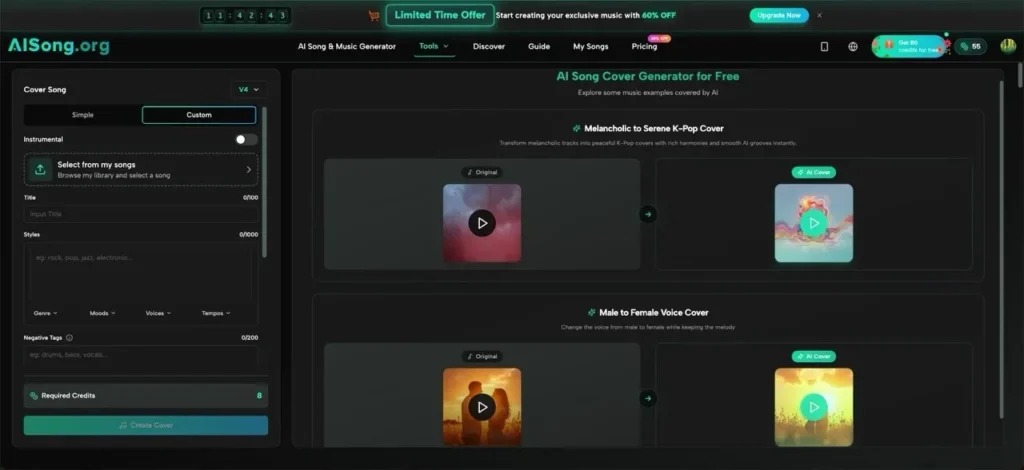
For content creators, producing a fresh vocal version of a song can require a singer, recording space, editing time, and several rounds of revision. This becomes difficult when you need regular audio for short videos, channel experiments, demos, or campaign content. AI Song brings music creation and post-generation tools together on AISong, while its AI Song Generator includes a dedicated cover workflow for changing the vocal character of tracks already created in your library. Instead of recording a new performance from scratch, you can select a base song, choose an AI voice style, process the transformation, and review the resulting cover. This gives creators a practical way to test different vocal directions while keeping the original melody, rhythm, and overall musical structure recognizable.
What Is the AI Song Generator?
AISong is an AI music creation platform, and its cover feature focuses on vocal transformation. It takes an AI-generated song from your AISong library and applies a selected voice style while retaining the track’s core musical framework.
For content creators, this connects song generation with song adaptation. One track can be tested with a brighter pop vocal, a grittier rock delivery, a smoother R&B character, or another genre-oriented voice without arranging a new recording session.
Traditional Cover-Song Challenges
Creating a conventional cover often involves several separate tasks:
- Finding a singer whose tone and range suit the track
- Booking recording time and preparing the session
- Capturing clean vocals with suitable equipment
- Editing timing, pitch, phrasing, and background noise
- Repeating the process to compare vocal directions
These steps can be suitable for a final studio release, but they are slow for early testing or frequent social content. A creator may only need to know whether a different vocal character improves the idea before committing more resources.
AI-assisted cover creation reduces that initial workload. It offers a faster way to compare interpretations, prepare references, and choose a direction for further development.
How AISong Handles Song Covers
Intelligent Voice Matching
AISong positions intelligent voice matching as a way to connect a source track with suitable vocal choices. The feature considers factors such as genre, tempo, mood, and vocal range when helping users find an appropriate voice.
This can reduce trial and error when a creator is unsure which vocal style fits the existing song.
Natural Vocal Performance
AISong aims to preserve expressive details during the transformation. The feature page highlights elements such as vibrato, breath control, pitch variation, articulation, emotional dynamics, and musical phrasing.
The goal is to introduce a different vocal character while respecting the original performance structure and the song’s emotional movement.
Multi-Genre Voice Specialization
The voice library covers different musical styles. Pop voices are positioned for brighter delivery, rock voices for grittier performances, R&B voices for smoother expression, and country voices for warmth and twang.
Electronic, classical, opera-oriented, and other voice styles provide additional directions to test against the same base track.
Output and Usage
After processing, the cover can be downloaded as a high-quality audio file for YouTube videos, TikTok posts, Instagram content, demos, or creative references.
AISong states that usage rights apply to the vocal transformation created by the platform. Creators should still confirm the rights attached to the underlying composition, lyrics, recording, and any third-party material before publishing or monetizing a cover.
How to Create an AI Song Cover
Step 1 – Select Your Base Track
Choose a song from your existing AISong music library. The cover tool works with tracks already generated on the platform, so you do not need to upload a local audio file or convert it into another format.
Select a track with a clear vocal performance and a musical arrangement that already fits your intended content. The cover feature changes the vocal style rather than rebuilding the composition from the beginning.
Step 2 – Pick Your AI Voice Style
Open the cover tool and browse the available vocal styles. The AI Song Generator provides genre-oriented options covering styles such as pop, rock, R&B, country, electronic music, and others.
Choose a voice that suits the track’s genre, mood, vocal range, and intended audience. Matching the voice to the existing musical style is a practical starting point, but creators can also test contrasting vocal characters to explore a different direction.
Step 3 – Process the Cover
Start the cover-generation process after choosing the base track and voice. AISong analyzes the original vocal performance and applies the selected voice character while retaining the melody, rhythm, phrasing, and emotional structure.
Processing handles the vocal transformation without requiring a new recording session. The result is a new interpretation of the existing AISong track rather than an entirely different composition.
Step 4 – Download and Share
When processing is complete, preview the generated cover and listen for vocal clarity, style compatibility, and consistency across the track. Trying more than one voice can help you identify the version that best supports your content.
Download the completed cover in the available high-quality audio format. You can then add it to a video edit, social post, demo, or another production workflow according to AISong’s terms and the rights attached to the underlying music.
Use Cases for Content Creators
- Short-Form Video Creatators — Rework a track with a different vocal identity for TikTok, Reels, or Shorts without arranging a new singing session.
- YouTube Channel Producers — Compare vocal interpretations for music videos, creative experiments, or recurring channel formats.
- Independent Musicians — Build reference versions before choosing a singer, genre direction, or final performance style.
- Brand Content Teams — Test whether a different vocal tone fits a campaign before investing in full audio production.
FAQ
How Does the Cover Workflow Work?
Select an AI-generated track from your AISong library, choose an AI voice style, and start the transformation. Once processing is complete, preview the cover and download the version that best fits your project.
Can I Use the Cover Commercially?
AISong states that commercial usage rights apply to the vocal transformation it generates. These terms do not automatically replace permissions for the original composition, recording, lyrics, or other protected material, so check the rights behind the base track before commercial use.
Which Voice Styles Are Available?
The feature page mentions genre-oriented voices for pop, rock, R&B, country, electronic music, classical or opera styles, and other categories. Available choices may vary, so select from the voice options displayed inside the cover tool.
Conclusion
AISong’s cover feature adds a practical vocal-transformation stage to the broader AI song generation workflow. It helps content creators take an existing AI-generated track, compare new vocal characters, and prepare usable audio references without rebuilding or rerecording the entire song.
AISong is worth trying when you already have a track and want to test how another vocal style changes its direction. Select a song from your library, compare suitable voices, and generate a new cover for your next content project.

Happy
0 %

Sad
0 %

Excited
0 %

Sleepy
0 %

Angry
0 %

Surprise
0 %
 0
0
 0
0
More Stories

Why AI Image Generators With Image Upload Support Are Becoming Essential
Text-only AI image generation is impressive, but for businesses it quickly hits a ceiling. A prompt can create a beautiful...

Best Cloud Phones for Managing Multiple Business Accounts
Managing multiple business accounts can become difficult when a company depends entirely on physical smartphones. Social media teams, marketing agencies,...

WoW Forever Gold: How Players Can Manage Costs and Save Time on Progression
Gold has always influenced how smoothly a World of Warcraft character develops. It pays for useful items, profession materials, consumables,...

How Industry-Specific Digital Marketing Drives Growth for Dental, Medical Tourism and Fashion Brands
The key focus of every industry in the present world is to have a distinct digital marketing strategy. Without that,...

BestLinks AI Vs A Paid Invoice For Listings
Directory owners in India often treat a vendor email as a price check. The mailbox looks harmless because no rupee...

The Problem With Software “Best Of” Lists — And What a Recommendation-First Approach Looks Like Instead
Anyone who has tried to pick a SaaS tool recently knows the drill: open a "Top 10" listicle, find ten...